Best Desk Setup for Programmers in 2026: Complete Coding Setup
The best desk setup for programmers in 2026: monitor, keyboard, mouse, chair, desk, and dock picks, plus three complete coding builds from $1,000 to $6,000+.

Quick verdict: The best desk setup for programmers in 2026 is a 27-inch 4K or 5K monitor, a compact mechanical keyboard, a chair with real lumbar and arm adjustment, and a dock so your laptop connects with one cable. That is the whole formula. Everything else is a refinement. For most developers the best programming setup lands around $2,500: a Dell U2725QE (or two), a Keychron Q1 HE, a Logitech MX Master 4, a FlexiSpot E7, a Branch Ergonomic Chair Pro, and a CalDigit TS5 dock. A very good setup for coding is possible at $1,000, and a dream build passes $6,000.
We may earn a commission if you buy through our links.
This guide covers each component, why it matters for code, and three complete builds with totals. Check current prices before you buy.
Quick Picks: Best Programmer Desk Setup Components
| Category | Our pick | Why | Price |
|---|---|---|---|
| Monitor (all-round) | Dell UltraSharp U2725QE | 27” 4K IPS, USB-C hub, KVM, works on Mac and Windows | around $500–600 |
| Monitor (Mac) | Apple Studio Display (2026) | 27” 5K, single Thunderbolt cable, 218 PPI text | $1,599 |
| Monitor (value 5K) | Samsung Odyssey G8 G80HF | 27” 5K IPS at 165Hz, same density as Apple | $950 |
| Keyboard | Keychron Q1 HE | 75% hall-effect, QMK/VIA, aluminum, Mac/Win | around $200–220 |
| Keyboard (budget) | Keychron K2 HE | Hall-effect Keychron for less | around $130 |
| Mouse | Logitech MX Master 4 | Haptic wheel, Options+ actions, multi-device | $129 |
| Chair | Herman Miller Aeron | 12-year warranty, the benchmark for all-day sitting | around $1,500–2,000 |
| Chair (value) | Branch Ergonomic Chair Pro | Full adjustment under $500 | around $500 |
| Desk | FlexiSpot E7 | Dual-motor standing frame, stable with two monitors | around $450–599 |
| Dock | CalDigit TS5 Plus | 20 ports, 140W charging, Thunderbolt 5 | $499 |
| Lighting | BenQ ScreenBar | Task light with no screen glare | around $100–110 |
| Developer extra | Logitech MX Keypad | 9 LCD keys, Claude Code / Codex / Copilot plugins | $99.99 |
What Actually Matters in a Coding Desk Setup
Programming is a text job. Five rules decide whether a desk is good for code.
Text clarity, measured in PPI. A 27-inch 4K panel is about 163 PPI; a 27-inch 5K is 218 PPI. A 27-inch 1440p is 109 PPI, and at that density a 12-point code font shows visible edges. Density is the biggest upgrade for a developer’s eyes, more than size or refresh rate.
Usable screen area. An editor, a terminal, and docs visible without alt-tabbing. Two 27-inch monitors or one 34 to 40-inch ultrawide both get there.
Key feel and layout. Switches you like, arrow keys, and firmware you can remap matter more than RGB. Hall-effect boards let you set a lighter actuation for typing.
Sitting posture. Adjustable lumbar, seat depth, and armrests that drop to elbow height are non-negotiable. A standing desk helps, but only if you use it.
Cable and dock simplicity. A laptop that connects with one cable gets docked every time. One that needs four cables gets used on the couch.

Best Monitor for Programming
The Dell UltraSharp U2725QE is the all-round pick. It is a 27-inch 4K IPS Black panel with a USB-C input that charges a laptop, a built-in hub with Ethernet, and a KVM so a work laptop and a personal desktop can share the same keyboard and mouse. At around $500 to $600 (check current price), it works on every operating system without compromise. The older Dell U2723QE is the same idea and often cheaper.

Dell UltraSharp U2725QE
$640.00 on Amazon (as of Oct 2, 2026) · Price and availability may change.
For Mac users, the Apple Studio Display (2026) at $1,599 is still the reference. Its 5K panel matches macOS’s 2x scaling exactly, so text has no fractional-scaling softness, and one Thunderbolt cable carries video, power, webcam, and audio. It is expensive, but for a developer reading code all day the sharpness is the entire argument. Our Studio Display guide covers the tradeoffs.

Apple Studio Display (2026)
$1,560.42 on Amazon (as of Oct 2, 2026) · Price and availability may change.
The value 5K is the Samsung Odyssey G8 G80HF at $950: a 27-inch 5K IPS panel at 165Hz with the same 218 PPI as the Studio Display. It has no USB-C video input, so a laptop needs a dock, but it is the cheapest way to get Apple-level text density and it doubles as a gaming monitor.

Samsung Odyssey G8 G80HF
$699.99 on Amazon (as of Oct 2, 2026) · Price and availability may change.
For ultrawide, the LG 40WP95C is the developer choice: 40 inches at 5120x2160, IPS, with Thunderbolt input. It is two 4K-density displays without a bezel. The Samsung Odyssey OLED G9 is spectacular for games, but an OLED showing the same editor and status bar for eight hours a day is a burn-in risk, and its subpixel layout renders small text less cleanly than IPS. If you only code, stay IPS.
Best Keyboard for Programmers
The Keychron Q1 HE is the keyboard to beat for developers in 2026. It is a 75% aluminum board with magnetic hall-effect switches, so you can set the actuation point from a feather-light touch to a deep press, and it supports QMK and VIA-style remapping. It keeps arrow keys and a function row, has a Mac/Windows toggle, and works wired, 2.4GHz, or Bluetooth. Expect around $200 to $220; check current price. Our Q1 HE review has the details.

Keychron Q1 HE
$191.99 on Amazon (as of Oct 2, 2026) · Price and availability may change.
The budget pick is the Keychron K2 HE at around $130. Same hall-effect switches and 75% layout in a lighter plastic case. Most developers will not miss the aluminum.

Keychron K2 HE
$111.99 on Amazon (as of Oct 2, 2026) · Price and availability may change. Read our review
If you need a numpad, the Keychron Q6 Max at $219 is a full-size aluminum board with the same wireless stack and QMK support.

Keychron Q6 Max
$191.99 on Amazon (as of Oct 2, 2026) · Price and availability may change. Read our review
For split ergonomics, the ZSA Moonlander and the MoErgo Glove80 are the boards developers with wrist or shoulder pain keep recommending. Both split, tent upward, and add thumb clusters. Expect roughly $350 to $400 (check current price) and about two weeks to regain full typing speed. See our best mechanical keyboard roundup for more options.
Best Mouse for Coding
The Logitech MX Master 4 at $129 is the productivity mouse for developers. The MagSpeed wheel flicks through a long file in one spin, the thumb wheel handles horizontal scroll in wide diffs, and the haptic Actions Ring puts app-specific shortcuts under your thumb through Logi Options+. It pairs with three computers, which suits a work-laptop-plus-desktop desk.

Logitech MX Master 4
$118.00 on Amazon (as of Oct 2, 2026) · Price and availability may change. Read our review
The Logitech MX Master 3S is the same shape without the haptics, usually around $80 to $99 now, and the better value if the Actions Ring does not excite you. Our MX Master 4 vs 3S comparison goes deeper.

Logitech MX Master 3S
Prices change often. Check today's price on Amazon. Read our review
Best Chair for Long Coding Sessions
The Herman Miller Aeron is the benchmark: a 12-year warranty, three sizes, PostureFit lumbar, and mesh that does not sag. New it runs around $1,500 to $2,000; certified refurbished units are commonly $700 to $900 and the smartest way to buy one. Our Aeron guide covers sizing.

Herman Miller Aeron
$649.00 on Amazon (as of Oct 2, 2026) · Price and availability may change. Read our review
The Steelcase Leap V2 is the other chair developers keep for a decade: a padded seat instead of mesh, a flexing back, and a similar warranty. Choose it if you prefer cushioning. Our Aeron vs Leap V2 piece breaks down the differences.
Under $500, the Branch Ergonomic Chair Pro at around $500 is the pick: adjustable lumbar, 4D armrests, seat-depth slide, and a mesh back. Whatever you buy, adjust it properly before you judge it.
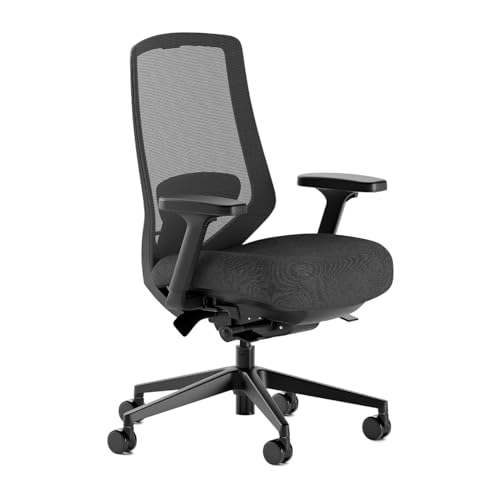
Branch Ergonomic Chair Pro
$499.00 on Amazon (as of Oct 2, 2026) · Price and availability may change. Read our review
Best Desk for Programmers
The FlexiSpot E7 is the standing desk that fits most developer budgets. Dual motors, enough rated load for two monitors on an arm plus a desktop, and a frame that stays stable at standing height. Bundles run around $450 to $599; check current price. Get at least a 60-inch top for dual monitors.
The Uplift V2 is the premium step up: a longer warranty, a deep configurator, and better stability at full height. Read our FlexiSpot vs Uplift comparison if you are between them.
The budget classic is still an IKEA Karlby countertop on an IKEA Alex drawer unit and a leg. Deep, wide, solid, and the drawers hide dongles. It does not stand, but it costs a fraction of a motorized frame. Our best desk for programmers roundup has more options.
Dock and Cables: One Cable to the Laptop
The CalDigit TS5 Plus at $499 is the dock to buy if your laptop has Thunderbolt 5, which includes the M4 Pro, M4 Max, M5 Pro, and M5 Max MacBook Pros. It has 20 ports, three downstream Thunderbolt 5 ports, 10Gb Ethernet, and 140W charging, so a 16-inch MacBook Pro runs at full speed on one cable. See our best Thunderbolt 5 dock guide for the cheaper TS5 and Mac-focused options.

CalDigit TS5 Plus
$499.99 on Amazon (as of Oct 2, 2026) · Price and availability may change. Read our review
On a budget, an Anker USB-C dock in the $100 to $200 range handles one 4K display, USB, Ethernet, and charging, which is enough for a single-monitor desk.
Then hide the cables. An under-desk cable tray holds the power strip and dock brick, and velcro cable ties bundle the runs. On a standing desk, leave slack for the full height range.
Lighting for Late-Night Coding
The BenQ ScreenBar sits on the top edge of the monitor and throws light down onto the desk, not the screen. No glare, no desk footprint, adjustable color temperature, around $100 to $110.

BenQ ScreenBar
$199.00 on Amazon (as of Oct 2, 2026) · Price and availability may change. Read our review
The BenQ ScreenBar Halo 2 adds a rear bias light and a wireless dial, around $180. If you code at night in a dark room, get the Halo 2.
BenQ ScreenBar Halo 2
$199.00 on Amazon (as of Oct 2, 2026) · Price and availability may change. Read our review
Extras for Developers
A shortcut pad built for code. The Logitech MX Keypad launched September 8, 2026 at $99.99: nine LCD keys, 15 pages, and Logi Options+ profiles that swap per app. Logitech ships a GitHub Copilot integration, and the Logi Marketplace has community plugins for Claude Code and OpenAI Codex that show agent status on a key. Our MX Keypad review compares it to the Stream Deck.

Logitech MX Keypad
$99.99 on Amazon (as of Oct 2, 2026) · Price and availability may change.
A webcam that does not look like 2015. The Insta360 Link 2 is a 4K webcam with AI framing and good low-light output, around $200. Worth it if you are on stand-ups all day.

Insta360 Link 2
$199.99 on Amazon (as of Oct 2, 2026) · Price and availability may change. Read our review
Headphones for deep work. The Sony WH-1000XM6 is the noise-cancelling pick for open offices, around $450, with multipoint pairing and a mic good enough for calls.

Sony WH-1000XM6
$458.00 on Amazon (as of Oct 2, 2026) · Price and availability may change. Read our review

Three Complete Programmer Desk Setups
Totals are approximate street prices. Check current prices before ordering.
Budget coding setup (around $1,000)
| Item | Approx. price |
|---|---|
| Dell S2725QC 27” 4K USB-C (or a 27” 1440p on Windows/Linux) | $280–330 |
| Keychron K2 HE | $130 |
| Logitech MX Master 3S | $80–99 |
| Branch Ergonomic Chair Pro | $500 (often less on sale) |
| IKEA Karlby + Alex + leg | $150–200 |
| Cable tray and velcro ties | $30 |
| Total | about $1,200 at list, $1,000 on sale |
The chair is half the budget on purpose. It is the part that prevents injury.
Balanced setup (around $2,500)
| Item | Approx. price |
|---|---|
| Dell U2725QE x2 (or one Samsung G80HF 5K) | $1,000–1,200 |
| Keychron Q1 HE | $200–220 |
| Logitech MX Master 4 | $129 |
| FlexiSpot E7 (60” top) | $450–599 |
| Branch Ergonomic Chair Pro | $500 |
| BenQ ScreenBar | $100–110 |
| CalDigit TS5 dock | $300–350 |
| Total | about $2,700–3,100 |
The setup most developers should copy: it stands, docks in one cable, and every screen is 163 PPI or better.
Dream setup ($6,000+)
| Item | Approx. price |
|---|---|
| Apple Studio Display (2026) | $1,599 |
| Keychron Q6 Max ($219) or ZSA Moonlander | $219–380 |
| Logitech MX Master 4 | $129 |
| Herman Miller Aeron | $1,500–2,000 |
| Uplift V2 (72” top) | $900–1,200 |
| BenQ ScreenBar Halo 2 | $180 |
| CalDigit TS5 Plus | $499 |
| Logitech MX Keypad | $99.99 |
| Mac mini M6 or Mac Studio | $900–2,500 |
| Total | about $6,000–8,700 |
See our Mac mini desk setup guide for how the small desktop fits under a monitor.
Layout and Ergonomics for a Coding Desk
Put the top of the screen at or slightly below eye level, 20 to 28 inches from your eyes, tilted back a few degrees. On dual monitors, center the primary and angle the second 15 to 30 degrees to the side; do not split the bezel down the middle.
Keyboard and mouse belong at elbow height with forearms level and shoulders relaxed, which usually means a lower desk or a higher chair with a footrest. Tent a split board 10 to 20 degrees so your wrists are not rotated flat.
Follow the 20-20-20 rule: every 20 minutes, look 20 feet away for 20 seconds. Set a timer. Our ergonomic workspace guide covers chair adjustment step by step, and the dual monitor guide covers arm placement.
Mac vs Windows and Linux Notes
macOS scaling is why Mac developers should be picky about monitors. macOS renders sharpest at exact 2x, which a 27-inch 5K delivers at “looks like 2560x1440.” A 27-inch 4K also looks right, even scaled to a 1440p-equivalent workspace, thanks to its density. A 27-inch 1440p has no 2x mode and text looks soft. Windows and Linux handle fractional scaling better, so a 1440p 27-inch is fine there on a budget.
Thunderbolt 5 arrived on the M4 Pro and M4 Max and continues on the M5 Pro and M5 Max, so those laptops drive a TS5 Plus at full bandwidth. Base M-series chips and most Windows ultrabooks are Thunderbolt 4 or USB4, still plenty for two 4K displays. See our best monitor for MacBook Pro, MacBook Pro desk setup, and Mac mini desk setup guides for Mac-specific picks.
Linux users should prefer plain DisplayPort or DisplayPort-over-USB-C and avoid features that need a vendor app. The U2725QE’s KVM works without software.
Mistakes Programmers Make With Their Desk Setup
- Buying a 27-inch 1440p monitor for a Mac. Text is visibly softer than 4K at the same size. Spend the extra $150.
- Buying a gaming chair for a coding job. Bucket seats lock one posture and rarely offer lumbar or seat-depth adjustment. Our gaming chair vs office chair comparison explains why.
- Running an OLED ultrawide as your only all-day text display. Burn-in risk on static UI and less clean small text. Great second screen, poor primary editor.
- Skipping the dock. A laptop with four cables to plug in ends up on the couch, and the desk goes unused.
Bottom Line
The best desk setup for programmers in 2026 starts with the monitor and the chair, then adds a keyboard you enjoy typing on and a dock that makes the whole thing one-cable. A Dell U2725QE, a Keychron Q1 HE, an MX Master 4, a FlexiSpot E7, and a Branch Pro is the balanced build most developers should copy. Mac users with the budget should step up to the Studio Display; anyone with wrist pain should try a split board first. Buy density and posture first, and the rest of the coding setup can grow over time.
Recommended Gear
Products we've reviewed that fit this guide. We may earn a commission if you buy through our links.


Frequently Asked Questions
- What monitor size is best for programming?
- A 27-inch monitor at 4K or 5K is the sweet spot for programming. It fits two editor panes or an editor and a terminal side by side, and the 163 to 218 PPI density makes small code fonts crisp. A 32-inch 4K works if you sit further back. On macOS, avoid 27-inch 1440p, which renders text softer than a 4K panel at the same size.
- Is an ultrawide or dual monitors better for coding?
- Dual 27-inch monitors give more total pixels and cleaner window snapping, and they are cheaper for the same screen area. A 34 to 40-inch ultrawide removes the center bezel and suits a three-column layout. Skip OLED ultrawides for all-day code editors: static text and taskbars are the worst case for burn-in, and the subpixel layouts render small text less cleanly than IPS.
- What keyboard do most programmers use?
- Compact mechanical keyboards dominate developer desks. Keychron's 75% boards like the Q1 HE and K2 HE are the most common recommendations because they keep the arrow and function keys, support QMK/VIA remapping, and work on Mac and Windows. Developers with wrist pain often move to a split board such as the ZSA Moonlander or Glove80 after a two-week adjustment.
- Is a standing desk worth it for programmers?
- Yes, if you will use it. Standing for 20 to 30 minutes a few times a day breaks up the long static sitting that causes back and hip stiffness. A dual-motor frame like the FlexiSpot E7, at around $450 to $599, is stable at monitor height and can hold two displays on arms. Pair it with a monitor arm so the screen stays at eye level in both positions.
- How much should a programmer desk setup cost?
- A solid programmer desk setup costs about $1,000 with a 4K monitor, a hall-effect Keychron, an MX Master 3S, a Branch chair, and an IKEA desk. Around $2,500 buys dual 4K displays or one 5K, a standing desk, a better chair, and a Thunderbolt dock. Past $6,000 you are into a Studio Display, an Aeron, and a Mac Studio, which only pays off if you sit there eight hours a day.
Related Guides

Best Desk for Programmers in 2026: Standing, L-Shaped, and Budget
Best desk for programmers in 2026: FlexiSpot E7 for most, Uplift V2 for tall users, IKEA Karlby and Alex on a budget. Plus sizing for two 27-inch monitors.

Best Mechanical Keyboards in 2026: Gaming, Typing, and Wireless
The best mechanical keyboards in 2026 for typing, gaming, and wireless use. Top pick: Keychron Q1 Pro. Covers switches, layouts, and who each one suits.

Best Monitor for MacBook Pro in 2026: 5K, 6K, and 4K USB-C Picks
The best monitors for MacBook Pro in 2026. Top pick: the new Apple Studio Display. Covers 5K vs 4K scaling, Thunderbolt 5 charging, and M-series display limits.

Best Thunderbolt 5 and USB-C Docks for a Desk Setup in 2026
The best Thunderbolt 5 and USB-C docks for a single-cable desk setup in 2026. Top pick: CalDigit TS5 Plus. Covers bandwidth, charging watts, and display limits.
Setup Inspiration
All setups →
Clean Minimal Developer Setup with Ultrawide Monitor
A distraction-free developer workspace featuring an ultrawide monitor, mechanical keyboard, and standing desk. Perfect for focused coding sessions.
Total: $1,850

Programmer Dark Mode Setup with Ultrawide and Mechanical Keyboard
A dark mode programmer setup with a 34-inch ultrawide, Keychron Q1 Pro, and bias lighting designed for long late-night coding sessions. Total cost: $1,320.
Total: $1,320

Ergonomic Home Office Setup Built Around the Herman Miller Aeron
A premium ergonomic home office setup centered on the Herman Miller Aeron chair, FlexiSpot E7 standing desk, and monitor arm. Built for all-day comfort. Total cost: $2,870.
Total: $2,870