PS5 Desk Setup: Console Gaming Station with 4K Monitor
A PS5 desk setup with a 4K 144Hz monitor, gaming headset, and cable management for a clean console gaming workstation. Total cost: $1,140.
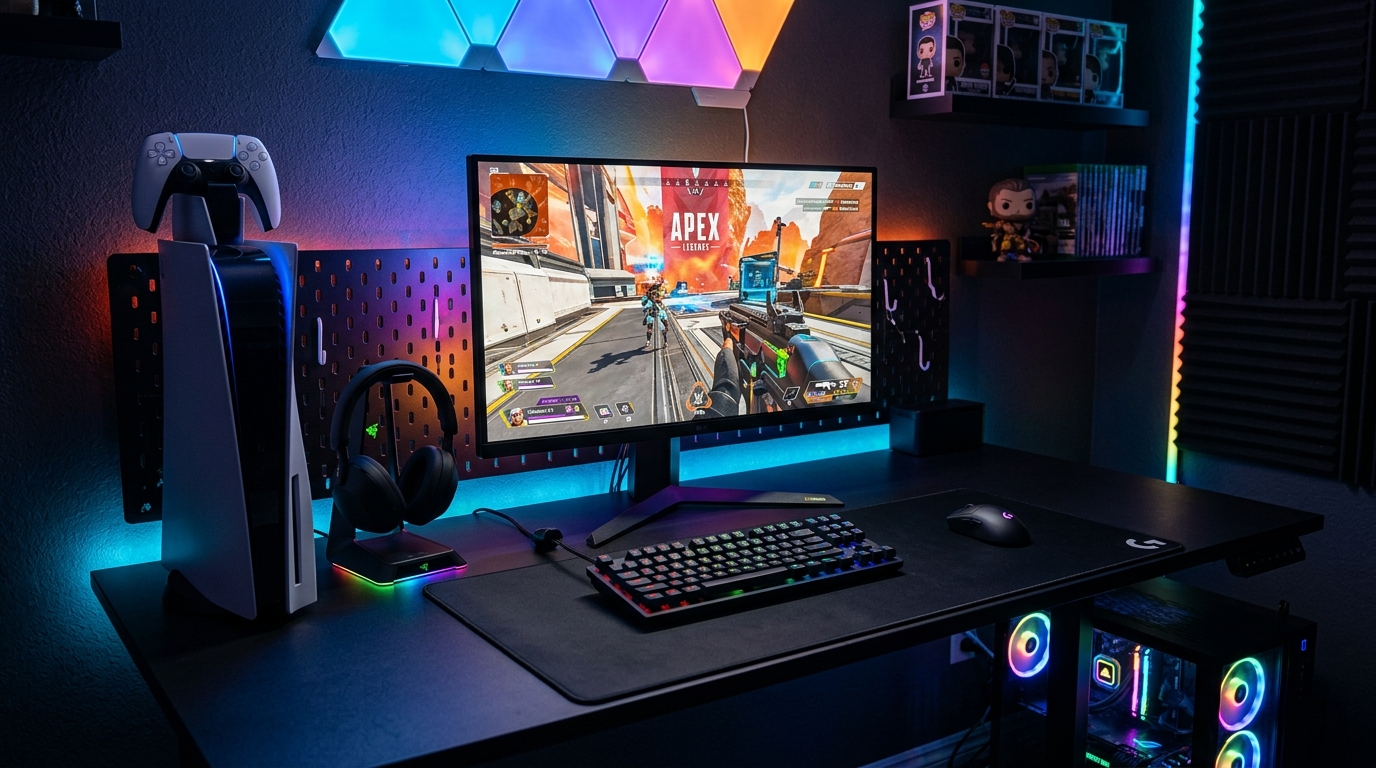
This setup is built around the Sony PlayStation 5 Console at $499. Console gaming at a desk is a different experience than a couch and TV setup. Closer viewing distance means better reaction time. A monitor designed for the PS5’s output makes a visible difference. Total cost is $1,140.
We may earn a commission if you buy through our links.
Monitor Choice: LG 27GP850-B 1440p at $299
The PS5 outputs up to 4K at 120Hz or 1440p at 120Hz via HDMI 2.1. The LG 27GP850-B 27-inch Monitor targets 1440p at 165Hz with a 1ms response time. Here’s the honest breakdown: at a 27-inch desk setup viewing distance, 1440p looks nearly identical to 4K. The difference is visible on a 55-inch TV across a room. Up close at 27 inches, sharpness is excellent at 1440p.
The LG 27GP850-B supports VRR (Variable Refresh Rate) through HDMI, which the PS5 uses when running at variable frame rates. That eliminates screen tearing without needing G-Sync or FreeSync branding. HDMI 2.1 compatibility means the PS5 runs at its full 120Hz potential. HDR10 support is present. The actual HDR implementation on this panel is limited to 400 nits peak brightness, which is entry-level HDR. Set expectations accordingly.
The Desk: IKEA UPPSPEL Gaming Desk at $299
The IKEA UPPSPEL Gaming Desk at $299 is a clean surface with cable management built in. The rear channel routes the HDMI cable and power from the PS5 through the desk without visible runs. The surface holds the monitor, controller stand, and headphones without crowding. I place the PS5 vertically to the right of the monitor. It fits without overhanging the edge.
Console cable management is messier than PC setups. The PS5 has a large HDMI cable, a power cable, and the controller charging stand adds another cable. The Cable Management Box at $22 sits under the desk and holds the power strip and cable overflow.
Audio: Sony WH-1000XM5 at $279
I chose headphones over a gaming headset. The Sony WH-1000XM5 at $279 provides better audio quality than any gaming headset at this price. The noise cancellation matters when gaming in a shared space. Chat audio works through the PS5’s controller 3.5mm jack with an included adapter. Sound quality for music and gaming is in a different category than purpose-built gaming headsets. The trade-off is no built-in microphone for chat. A $15 clip-on mic solves this if needed.
PS5 Placement
The PS5 is large. Placing it on the desk surface next to the monitor works with the UPPSPEL’s 63-inch width. Standing it vertically reduces the footprint significantly. The PS5 Controller Charging Stand at $25 sits to the left of the monitor. It keeps two controllers charged and visible. The stand charges via USB-A from the PS5’s rear port.
The Govee Bias Lighting Strip at $17 runs behind the monitor. At night, it reduces the contrast between the bright screen and the dark room. Eye strain over long sessions drops noticeably.
What I’d Change
The LG 27GP850-B doesn’t support HDMI 2.1 at 4K. If 4K60 matters to you, this isn’t the right monitor. I prioritized refresh rate over resolution for the types of games I play. For cinematic single-player games, a true 4K display would be worth the upgrade. The Sony WH-1000XM5 headband is slightly stiff out of the box. It loosens after a few weeks. If comfort is the priority from day one, the Sony WH-1000XM4 is a softer fit.
Gear in This Setup
Sony PlayStation 5 Console
$499
LG 27GP850-B 27-inch 1440p Monitor
$299
Sony WH-1000XM5 Headphones
$279
PS5 Controller Charging Stand
$25
IKEA UPPSPEL Gaming Desk
$299
Cable Management Box
$22
Govee Bias Lighting Strip
$17