Best Cable Management Solutions for Your Desk in 2026
The best cable management products for your desk in 2026: trays, spines, clips, and sleeves. Covers under-desk and standing desk solutions.

Quick Picks
- Best tray: VIVO Under-Desk Cable Tray
- Best wall routing: Delamu J-Channel Raceway
- Best for standing desks: VIVO Cable Spine
- Best ties: Velcro One-Wrap ties
- Best power strip box: Cable Matters cable box
- Best sleeve: Electop cable sleeves
We may earn a commission if you buy through our links.
What to Look For
Mounting method comes first. Screw mounts are stronger but permanent. Adhesive mounts work on surfaces where drilling isn’t an option. Check what your desk allows before buying.
Capacity matters more than most people expect. Count your cables before buying a tray. A tray rated for one power strip may not hold a surge protector plus four bundled cable runs.
Standing desk compatibility is a separate consideration. Fixed trays and clips work fine on sit-only desks. If your desk raises and lowers, you need a cable spine or retractable sleeve to absorb the height change without pulling cables tight.
Material affects durability and heat. Metal mesh trays allow heat dissipation from power strips. Plastic raceways are lighter and easier to paint. Both work well in typical home office environments.
Budget vs. completeness. Buy everything you need in one order. Cable management done halfway looks worse than none at all. Plan your full solution, then buy.
Best Under-Desk Tray: VIVO Under-Desk Cable Management Tray
The VIVO Under-Desk Cable Management Tray is the default recommendation for a reason. It fits a standard power strip and a bundled cable run inside a metal mesh basket. Two mounting options are included: screw mount for solid wood surfaces and adhesive pads for surfaces where drilling is not an option.
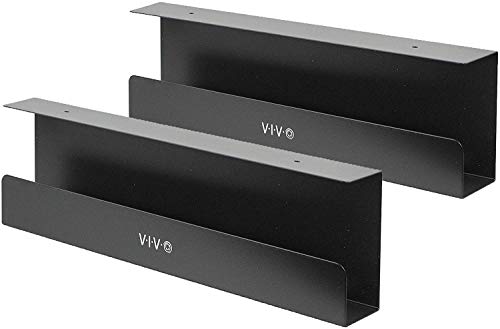
VIVO Under-Desk Cable Management Tray
$37.99 on Amazon (as of Oct 2, 2026) · Price and availability may change. Read our review
The metal mesh construction matters. Power strips generate heat. A solid plastic tray traps that heat against the desk surface. The VIVO’s open mesh lets it dissipate normally.
At under $20, it is easy to buy two: one for the power strip, one for excess cable length. This is the first product most desk setups need.
Best Wall Routing: Delamu J-Channel Raceway
Wall-mounted cables need a different solution than under-desk cables. The Delamu J-Channel Raceway mounts directly to baseboards or drywall using adhesive strips or screws. Cables drop into the channel and the cover snaps closed over them.

Delamu J-Channel Raceway
$16.99 on Amazon (as of Oct 2, 2026) · Price and availability may change.
The J-channel profile is low profile and paintable. Run it from desk height to floor level and it practically disappears. For longer runs between rooms or down a wall to a floor outlet, the Delamu kit includes 157 inches of raceway in joinable sections.
If you have a larger cable bundle, the D-line raceway from the same brand offers a wider channel. Both systems use the same mounting approach.
Best for Standing Desks: VIVO Cable Spine
A standing desk creates a cable management problem that trays alone cannot solve. When the desk rises, cables attached to the floor or wall get pulled taut. The VIVO Cable Spine solves this with a flexible vertical tube that expands and contracts with desk height.

VIVO Cable Spine
$34.99 on Amazon (as of Oct 2, 2026) · Price and availability may change.
Mount the spine to the desk leg using the included clamp. Feed all desk cables through the spine. The spine compresses when the desk lowers and extends when it rises. Cables move with the desk instead of fighting it.
The VIVO spine handles desks ranging from 28 to 48 inches in height and fits cable bundles up to about 1.5 inches in diameter. Most standard standing desk setups fit within that range.
Best Ties: Velcro One-Wrap Ties
Zip ties are permanent. Velcro ties are not. Velcro One-Wrap ties are the practical choice for any cable bundle you might need to change later, which is nearly every cable bundle.

Velcro One-Wrap Ties
$15.89 on Amazon (as of Oct 2, 2026) · Price and availability may change.
They grip firmly, release cleanly, and survive repeated use. The 10-inch length handles most desktop cable bundles. Buy the multi-pack and use them everywhere: bundling cables before they enter a tray, securing the spine to the desk leg, grouping monitor cables at the back of the desk.
Best Power Strip Box: Cable Matters Cable Box
A power strip sitting on a shelf or floor is an eyesore. The Cable Matters cable box hides the power strip and its connected cables inside a ventilated enclosure. The top and sides have ventilation slots. Cables enter and exit through openings at each end.

Cable Matters Cable Box
$15.99 on Amazon (as of Oct 2, 2026) · Price and availability may change.
The box sits on the floor or inside a desk shelf. It works with most standard 6-outlet and 8-outlet surge protectors. If your power strip is bulkier than standard, measure it before ordering.
Best Sleeve: Electop Cable Sleeves
For long parallel cable runs where multiple cables go the same direction, a cable sleeve is cleaner than individual ties. Electop cable sleeves use a split-loom design that lets you add or remove cables without threading everything through from one end.
Electop Cable Sleeves
Prices change often. Check today's price on Amazon.
The split down the center is the key feature. Zip-up or wrap-around sleeves require disconnecting cables to install or change them. Electop’s split design goes on in seconds.
Available in multiple diameters. The 1/2-inch size handles 2-4 cables. The 1-inch size handles larger bundles. Measure your cable run before ordering.
Bottom Line
Start with the VIVO tray and Velcro ties. These two products solve the majority of under-desk cable chaos for under $25. Add the VIVO cable spine if you have a standing desk. Use Delamu raceways for wall runs. The Cable Matters box handles an exposed power strip. Finish exposed cable runs with Electop sleeves.
Cable management is not a single product purchase. It is a system. Buy the right combination for your specific setup and install everything at once.
Recommended Gear
Products we've reviewed that fit this guide. We may earn a commission if you buy through our links.


Frequently Asked Questions
- What is the best way to manage cables under a desk?
- Mount a cable tray under your desk surface to hold power strips and excess cable length. Use velcro ties to bundle cables into groups. For standing desks, add a vertical cable spine to keep cables tidy during height changes. This three-part approach handles most setups.
- How do I hide cables along a wall?
- J-channel cable raceways mount to baseboards or walls and snap shut over cables. They paint over easily if you want them to disappear. For larger cable bundles, wider D-line raceways handle more volume. Adhesive cable clips are better for routing along a single edge.
- How many cables does a typical desk setup have?
- A dual-monitor desk with a desktop, keyboard, mouse, lighting, and speaker has 10-16 cables. A laptop-only setup may have 3-5. Count yours before buying cable management products so you size trays and spine capacity correctly.
- Should I use a cable sleeve or individual cable ties?
- Cable sleeves are better for parallel runs where multiple cables go to the same destination. Individual velcro ties are better for bundles that split at different points. Use both: sleeve long parallel runs, velcro everything else.
Related Guides

Under-Desk Cable Management: Trays, Clips, and Sleeves That Work
A practical guide to under-desk cable management: which trays mount best, which clips stay put, and how to plan a clean setup from scratch.

IKEA Cable Management Guide: SKADIS, FIXA, and DIY Tricks
How to manage cables on an IKEA desk setup using SKADIS pegboards, FIXA cable clips, and popular third-party additions. Budget cable management that actually works.

How to Cable Manage a Standing Desk: Spine, Tray, and Velcro Method
Step-by-step guide to cable managing a standing desk so cables don't drag or tangle when the desk moves. Three methods covered for different budgets and setups.

Adjustable Standing Desk Buying Guide: Frame, Surface, and Motor
A practical buying guide for adjustable standing desks covering frame types, motor specs, tabletop materials, and what to skip. Updated September 2026.
Setup Inspiration
All setups →
Clean Standing Desk Setup with Zero Visible Cables
How I eliminated all visible cables from my standing desk setup using a cable spine, under-desk tray, and velcro. Full product list included.
Total: $850

FlexiSpot Standing Desk Setup: Build Guide and First Impressions
A detailed look at building a home office around the FlexiSpot E7 standing desk, including cable management, monitor arm setup, and what surprised me.
Total: $1,020

My Standing Desk Home Office Setup for Full-Time Remote Work
A full-time remote work home office setup built around a FlexiSpot E7 standing desk, dual monitors, and clean cable management. Total cost: $1,650.
Total: $1,650